Otter Transcribe Voice Notes
App · Otter.ai, Inc. · Productivity
Get Otter Transcribe Voice Notes on the official store
We never host downloads — install from the official store.
Overview
Otter Transcribe Voice Notes is a Productivity app from Otter.ai, Inc..
It is listed on iOS.
On the App Store, Otter Transcribe Voice Notes is free to install, is at version 3.101.0, sits in the Productivity category, carries a 4+ content rating, holds 4.7 from 55,174 ratings, and shows 10 screenshots.
Only the App Store rating is published for Otter Transcribe Voice Notes, and it is shown on its own rather than combined with any other figure.
findmyapps.net shows each store's listing as published and links out to the official App Store page; the stores' ratings are shown separately and never combined, and no downloads are hosted here.
Prices, versions, and ratings reflect the most recent check of the official stores and can change at any time, so confirm the current details on the official App Store page before installing Otter Transcribe Voice Notes.
About Otter Transcribe Voice Notes
Never take meeting notes again. Otter AI is the fastest way to transcribe voice in real time. Get a meeting assistant that records audio, writes notes, automatically captures slides, and generates summaries.
Available in English, Spanish, French and Japanese. Otter AI is also available on the web. Start for free.
Automated meeting notes for Zoom, Google Meet, Microsoft Teams, and more. Stay connected and collaborative when you work from home.
Otter transcribes all your meetings, interviews, lectures, and everyday voice conversations in real time, so you can focus on the discussion.
Key Features
• AI Meeting Assistant: get automated meeting notes & summaries
• AI Chat: get answers and generate content
• AI Channels: combine live conversations with async updates. Chat with teammates.
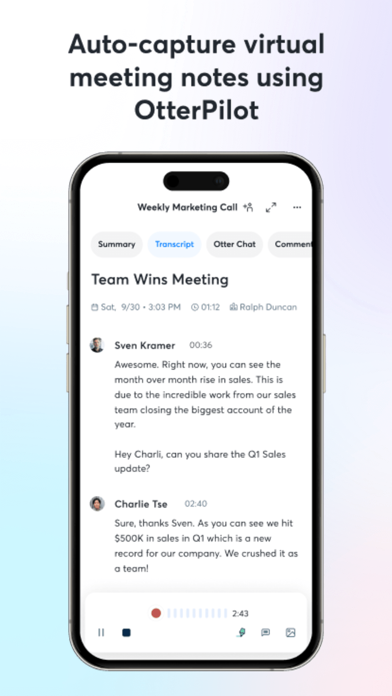
• Record & transcribe live
• Automated meeting notes & summaries
• Share & collaborate
• All notes are searchable & shareable
• Edit & highlight
• Organize & export
• Import & sync
Looking for a specific feature? Here are the details:
Record & Transcribe Live
• Instantly record in one tap
• Transcribe in real time
• Highlight key points to review later
• Insert photos of whiteboard discussions, slides, etc.
• Input audio via built-in mic or Bluetooth device
Enrich Notes With AI
• Gather information across all your conversations
• Ask questions about a specific meeting
• Generate follow- up emails
• Automated Slide Capture during virtual meetings
• Generate summary, outline and keywords after all meetings
• Punctuate, capitalize, and break paragraphs automatically
Share & Collaborate
• Invite group members to view, edit, and highlight collaboratively
• Add comments and assign action items
• Share links externally
Search & Playback
• Search the text so you don't have to scrub through the whole audio
• Playback at adjustable speeds
• Follow along the highlighted word as the audio is playing
• Tap on any word to jump the audio to that spot
Edit & Highlight
• Edit the text to correct any errors
• Tag the speakers to label the paragraphs and train Otter to identify speakers too
• Highlight sentences in one tap
Import & Sync
• Import audio and video files
• Upload from other call recording apps
• Sync your calendars to be reminded to record your meetings and auto-title notes
• Import your contacts for easy sharing
Optimized For iOS
• Start/Stop recording with Siri Shortcut & home widget
• Record via AirPods
• Sync with iOS Calendar, Contacts & Camera
Otter Pro
Get more playback speeds, skip silence, and bulk export. Payment will be charged to your iTunes Account at confirmation of purchase. Subscription automatically renews unless auto-renew is turned off at least 24-hours before the end of the current period. Account will be charged for renewal within 24-hours prior to end of current period. You can manage your subscriptions in Settings and auto-renewal may be turned off by going to Settings after purchase. Any unused portion of a free trial if offered, be forfeited when you a subscription.
Need help? Check out our Help Center: https://help.otter.ai
Terms of Service: https://otter.ai/terms-of-service
Privacy Policy: https://otter.ai/privacy-policy
Store details
App Store
- Price: Free
- Rating: 4.7 from 55,174 ratings
- Version: 3.101.0
- Category: Productivity
- Content rating: 4+
Screenshots



Frequently asked questions
- Is Otter Transcribe Voice Notes free?
- Otter Transcribe Voice Notes is free to install from the official App Store listing.
- What devices does Otter Transcribe Voice Notes run on?
- Otter Transcribe Voice Notes is available on iOS.
- Who made Otter Transcribe Voice Notes?
- Otter Transcribe Voice Notes is developed by Otter.ai, Inc..
- How is Otter Transcribe Voice Notes rated?
- On App Store it has 4.7 from 55,174 ratings. Each store's ratings are shown separately and are never combined.
- Where can I get Otter Transcribe Voice Notes?
- Otter Transcribe Voice Notes links to its official App Store and Google Play listings. findmyapps.net does not host downloads.
Related Productivity apps
- Forms for Google Docs — Aurora Innovation
- BePresent: Screen Time Control — Screen Detox Inc
- Unrot: Earn your Screen Time — Unrot OÜ
- TickTick:To-Do List & Calendar — Appest Limited
- Brick - Ditch Distractions — Brick LLC (Wisconsin)
- VPN Windscribe: Fast & Secure — Windscribe Limited
- Manus - AI Agent & Automation — Butterfly Effect Pte. Ltd.
- VPN - Free VPN Fast Ⓡ — Aitiming Tech Pte. Ltd.
- 1Password: Password Manager — AgileBits Inc.
- Translator Go: AI Translate — MATdev
- Obsidian - Connected Notes — Dynalist Inc.
- Brainrot: Screen Time Control — Smolworks Inc