Tide Alert (Noaa) - Tide Chart
App · Rivolu LLC · Weather
Get Tide Alert (Noaa) - Tide Chart on the official store
We never host downloads — install from the official store.
Overview
Tide Alert (Noaa) - Tide Chart is a Weather app from Rivolu LLC.
It is listed on both iOS and Android.
On the App Store, Tide Alert (Noaa) - Tide Chart is free to install, is at version 3.3.2, sits in the Weather category, carries a 4+ content rating, holds 4.8 from 43,829 ratings, and shows 10 screenshots.
On the Google Play, Tide Alert (Noaa) - Tide Chart is free to install, sits in the WEATHER category, carries a Everyone content rating, and shows 6 screenshots.
Only the App Store rating is published for Tide Alert (Noaa) - Tide Chart, and it is shown on its own rather than combined with any other figure.
findmyapps.net shows each store's listing as published and links out to the official App Store and Google Play pages; the stores' ratings are shown separately and never combined, and no downloads are hosted here.
Prices, versions, and ratings reflect the most recent check of the official stores and can change at any time, so confirm the current details on the official App Store and Google Play pages before installing Tide Alert (Noaa) - Tide Chart.
About Tide Alert (Noaa) - Tide Chart
Tide Alert is the #1 app for tide predictions, tidal currents, and lunar phases, all in one beautiful interface. Powered by Noaa forecasts, it delivers accurate high and low times, current speeds, slack windows, swell data, water temperature, wind conditions for thousands of stations along the US coastline.
Set custom alerts for high tide, low tide, or any level you choose and never miss a window again. With full offline support, your data is always available, even without cell service.
What's New:
Tidal Currents & Slack Tides
• View real-time tidal current speed overlayed on the tide chart.
• See slack tide periods with estimated begin and end times.
• Current data sourced from Noaa current prediction stations.
Compare Tide Charts
• Compare multiple stations side by side.
• Add stations to compare directly from the map.
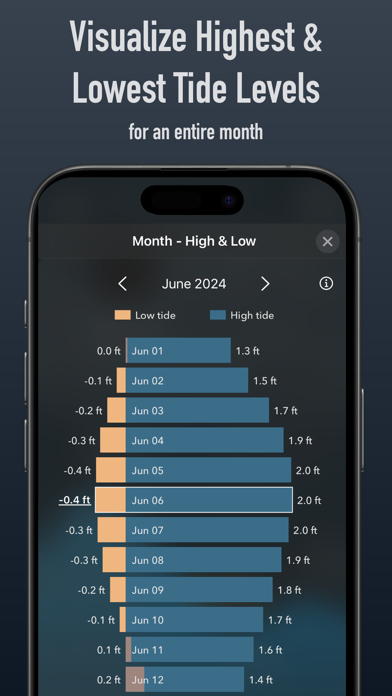
Monthly High & Low
• Redesigned monthly view with visual tide range bars.
• See the month's lowest, highest, and average tidal range at a glance.
Apple Watch
• New ocean conditions view with wind, swell height, water temperature, and current speed.
• Tap the wave icon on the main screen to check conditions instantly.
Wind, Swell & Water Temperature
• Hourly wind speed, gust, and direction forecasts.
• Swell chart with height, period, and direction.
• Water temperature from Noaa and Open-Meteo.
Who is Tide Alert for?
Anyone who needs to know the tides. Fishermen timing their catch. Surfers checking swell and tides together. Kayakers and paddleboarders planning safe launches. Boaters sailors navigating harbors. Crabbers clammers working low Beach photographers chasing golden hour at low tide. Dog walkers, birdwatchers, tide pool explorers. Divers planning slack water entries.
Key Features:
• Tide predictions for thousands of Noaa stations across the US.
• Tidal current speed and slack tide annotations on the chart.
• Custom tide alerts — get notified for high tide, low or any level.
• Full offline access to tide data and charts for favorite stations.
• Interactive map with station discovery and quick actions.
• Compare tide charts across multiple stations.
• Monthly high & low tide overview with daily range bars.
• Wind, swell, and water temperature conditions.
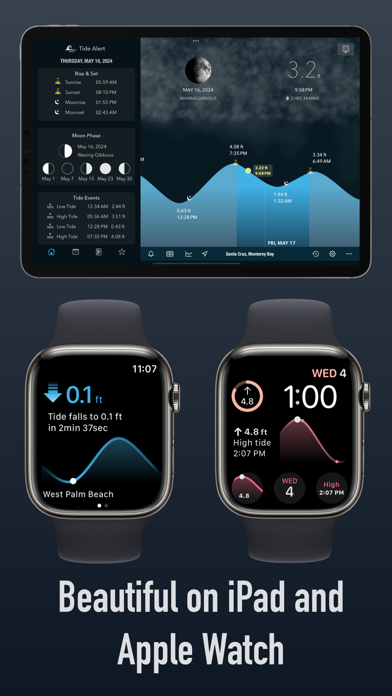
• Sunrise, sunset, moonrise, and moonset on the chart.
• Moon phase calendar.
• Apple Watch app with tide chart, conditions, and complications.
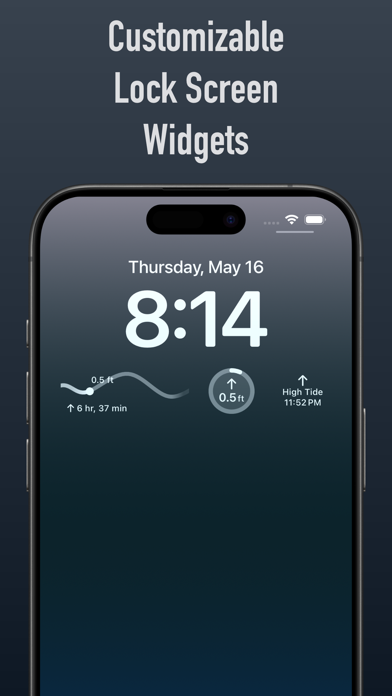
• Home Screen, Lock Screen, and StandBy widgets.
• iOS Shortcuts and Siri voice commands.
• Customizable chart symbols and reference levels.
• Supports all US time zones and daylight saving time.
Tide Alert is free to try with all features available during the trial period. After the trial, a subscription is required to continue.
Terms of Use: https://www.apple.com/legal/internet-ser…
Disclaimer — See https://tidealert.app/disclaimer.html
Use Tide Alert at your own risk. Tide data does not account for the effects of wind, storms, rain, freshwater runoff, or floods. The graph uses predicted high and low events with approximated segments between them. Do NOT use Alert for Navigation or any purpose that may result in personal injury or property damage. is liable any loss, injuries, or damage caused by its is associated with Noaa.
Store details
App Store
- Price: Free
- Rating: 4.8 from 43,829 ratings
- Version: 3.3.2
- Category: Weather
- Content rating: 4+
Google Play
- Price: Free
- Category: WEATHER
- Content rating: Everyone
Screenshots





Frequently asked questions
- Is Tide Alert (Noaa) - Tide Chart free?
- Tide Alert (Noaa) - Tide Chart is free to install from the official App Store and Google Play listing.
- What devices does Tide Alert (Noaa) - Tide Chart run on?
- Tide Alert (Noaa) - Tide Chart is available on iOS and Android.
- Who made Tide Alert (Noaa) - Tide Chart?
- Tide Alert (Noaa) - Tide Chart is developed by Rivolu LLC.
- How is Tide Alert (Noaa) - Tide Chart rated?
- On App Store it has 4.8 from 43,829 ratings. Each store's ratings are shown separately and are never combined.
- Where can I get Tide Alert (Noaa) - Tide Chart?
- Tide Alert (Noaa) - Tide Chart links to its official App Store and Google Play listings. findmyapps.net does not host downloads.
Related Weather apps
- Doppler Radar - Live Rain Map — Voros Innovation
- Ventusky: Weather Forecast — Ventusky s.r.o.
- PredictWind — Marine Forecasts — PredictWind Limited
- Weather Underground: Local Map — Weather Underground, LLC
- Surfline: Wave & Surf Reports — Surfline/Wavetrak
- Skai - Noaa Weather Radar — Tightrope Interactive, Inc.
- Wind Compass — Maple Media Apps, LLC
- Storm team 12 — Gray Television Group, Inc.
- Moon Calendar — MoonX — Vibes LLC
- Weather on the Way — Piotr Knapczyk
- RainDrop - Rain Totals & Radar — Raindrop Limited Liability Company
- (Not Boring) Weather — Not Boring Software LLC