Microsoft Authenticator
App · Microsoft Corporation · Productivity
Get Microsoft Authenticator on the official store
We never host downloads — install from the official store.
Overview
Microsoft Authenticator is a Productivity app from Microsoft Corporation.
It is listed on both iOS and Android.
On the App Store, Microsoft Authenticator is free to install, is at version 6.8.49, sits in the Productivity category, carries a 4+ content rating, holds 4.7 from 655,156 ratings, and shows 7 screenshots.
On the Google Play, Microsoft Authenticator is free to install, sits in the BUSINESS category, carries a Everyone content rating, holds 4.7 from 2,681,302 ratings, and shows 10 screenshots.
The App Store and Google Play ratings are listed side by side exactly as each store reports them, and are never averaged into a single score.
findmyapps.net shows each store's listing as published and links out to the official App Store and Google Play pages; the stores' ratings are shown separately and never combined, and no downloads are hosted here.
Prices, versions, and ratings reflect the most recent check of the official stores and can change at any time, so confirm the current details on the official App Store and Google Play pages before installing Microsoft Authenticator.
About Microsoft Authenticator
Use Microsoft Authenticator for easy, secure sign-ins for all your online accounts using multi-factor authentication, passwordless, or password autofill. You also have additional account management options your Microsoft personal, work or school accounts.
Getting started with multi-factor authentication
Multi factor authentication (MFA)provides a second layer of security. When enabled, during login after entering your password, you’ll be asked for an additional way to prove it’s really you. Either approve the notification sent to the Microsoft Authenticator, or enter one-time password (OTP) generated by app. OTP codes have a 30 second timer counting down. This timer is so you never have to use same time-based one-time (Totp) twice and don’t to remember number. doesn’t require to be connected to a network, and it won’t drain your battery. can add multiple accounts to app, including non-Microsoft accounts like Facebook, Amazon, Dropbox, Google, LinkedIn, GitHub, more.
Getting started with passwordless
Use your phone, not your password, to log into Microsoft account. Just enter username, then approve the notification sent to phone. fingerprint, face ID, or PIN will provide a second layer of security in this two-step verification process. After you’ve signed in with two factor authentication (2FA), you’ll have access to all Microsoft products and services, such as Outlook, OneDrive, Office, and more.
Getting started with autofill
Microsoft Authenticator app can also autofill passwords for you. Sign-in on the Passwords tab inside the Authenticator app with your personal Microsoft account to start syncing including saved in Edge. Make default autofill provider and start autofilling on apps and sites you visit on your mobile. are protected with multi-factor authentication in will need to prove yourself fingerprint, face ID, or PIN to access on mobile. can also import from Google Chrome other password managers.
Microsoft personal, work or school accounts
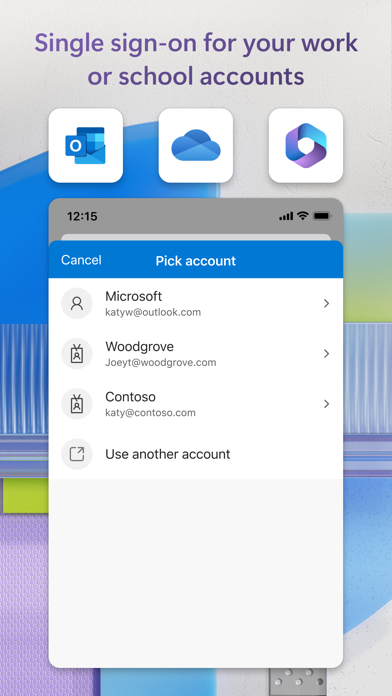
Sometimes your work or school might ask you to install the Microsoft Authenticator when accessing certain organization resources. You will need to register your device to organization through the app and add work or school account. Microsoft Authenticator supports cert-based authentication by issuing a certificate on device. This will let know that sign-in request is coming from a trusted and help seamlessly securely access additional apps services without needing to log into each.
Store details
App Store
- Price: Free
- Rating: 4.7 from 655,156 ratings
- Version: 6.8.49
- Category: Productivity
- Content rating: 4+
Google Play
- Price: Free
- Rating: 4.7 from 2,681,302 ratings
- Category: BUSINESS
- Content rating: Everyone
Screenshots




Frequently asked questions
- Is Microsoft Authenticator free?
- Microsoft Authenticator is free to install from the official App Store and Google Play listing.
- What devices does Microsoft Authenticator run on?
- Microsoft Authenticator is available on iOS and Android.
- Who made Microsoft Authenticator?
- Microsoft Authenticator is developed by Microsoft Corporation.
- How is Microsoft Authenticator rated?
- On App Store it has 4.7 from 655,156 ratings; on Google Play it has 4.7 from 2,681,302 ratings. Each store's ratings are shown separately and are never combined.
- Where can I get Microsoft Authenticator?
- Microsoft Authenticator links to its official App Store and Google Play listings. findmyapps.net does not host downloads.
Related Productivity apps
- Google Keep - Notes and lists — Google LLC
- Microsoft Copilot — Microsoft Corporation
- AI Chatbot - Nova — Scaleup Yazilim Hizmetleri
- Google Sheets — Google
- VPN - Super Unlimited Proxy — Mobile Jump Pte Ltd
- CamScanner - PDF Scanner App — Intsig Information Co., Ltd
- Meta AI — Meta Platforms, Inc.
- Mega: Encrypted Cloud Storage — Mega Limited
- Microsoft OneNote — Microsoft Corporation
- Grok - AI Chat & Video — X Corp.
- Link to Windows — Microsoft Corporation
- Google One — Google